
Getting started
Open or install
- Browser: open shine.lupyd.com/app. Nothing to install; your work stays in the page until you download it (File → Save).
- Desktop (faster): download for your system from
shine.lupyd.com or the
GitHub releases: Linux (x86-64, ARM64),
Windows (x86-64) or macOS (Apple silicon, Intel). Unpack it and run
shine(shine.exeon Windows). The desktop app uses every CPU core and your processor’s vector instructions, where the browser runs on one core, and it saves files directly. The archive also containsshine-mcp, the server for AI assistants (see AI assistants). - From source:
cargo run --release(Rust 1.88 or newer).
The window
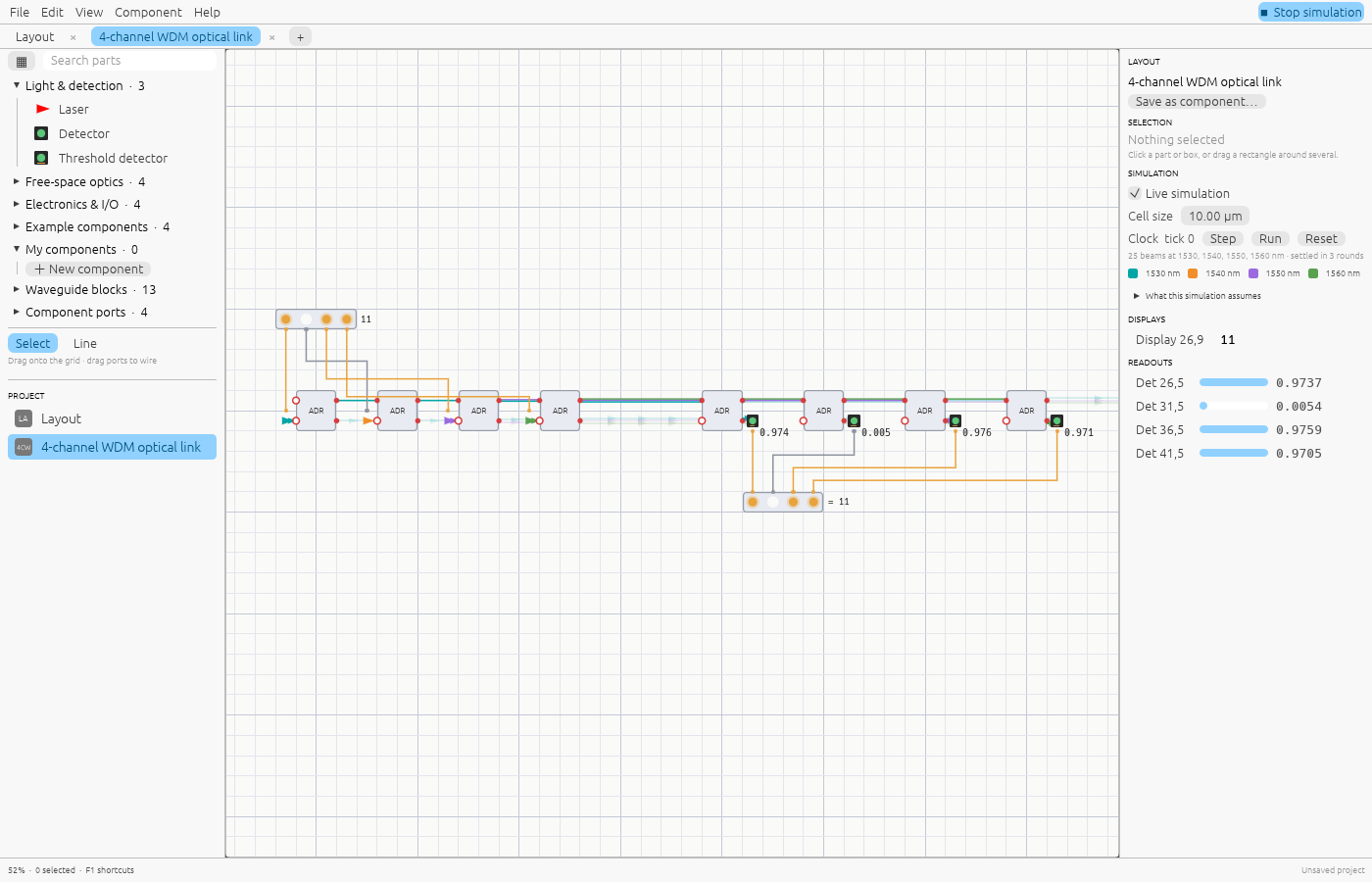
- Menu bar (top): File, Edit, View, Component, Help, and the Simulate / Stop simulation switch on the right. Simulation is on by default and updates as you edit.
- Tabs: one per open document. A project can hold many layouts; components are layouts too, and open in their own tab.
- Library (left): parts in folders, a search box, and ▦ to open the parts browser. Below it, the Project list of every document.
- Canvas (middle): the grid where you place parts and wire them.
- Inspector (right): the selected item’s settings and readings, simulation settings, the clock, displays and detector readouts.
- Status bar (bottom): zoom, the cell under the cursor, hints and messages.
Your first circuit: a laser and a detector
- Drag Laser from Light & detection onto the grid. It points right.
- Drag Detector to a cell a few cells to the right of the laser, on the same row.
- A beam appears and the detector reads
1.000, the laser’s power. - Drag a Beam Splitter between them. The beam splits; the detector now reads
0.500and the reflected half leaves the splitter at 90°. - Press R with the splitter selected to rotate it 45°, or G to move it.
Hover a beam to see its wavelength, power and phase.
Open an example
File → Examples… lists ready-made circuits. Start with these:
- 4-channel WDM optical link: what photonic chips do in data centres today. Click the input bits and they arrive at the receiver.
- 8-bit photonic adder: a teaching model of logic with light.
- Mach–Zehnder interferometer: interference on a free-space bench.
See Examples for what each one shows.
Next
- Editing explains the mouse and keyboard controls.
- Wiring light and signals explains the two kinds of connection.